---
title: How to Apply a Discount to a Fee, Other Charge or Disbursement Item
description: In the Account page, you can apply discounts to individual line items, such as legal fees or specific charges. This allows for flexible billing by reducing the total amount owing via a dollar value or a percentage.
---
[Skip to content](https://kb.prolegis.ca/-how-to-apply-a-discount-to-a-fee-other-charge-or-disbursement-item#main-content)
[![Full Prolegis Logo.png\]](https://kb.prolegis.ca/hs-fs/hubfs/Full%20Prolegis%20Logo.png?width=200&height=88&name=Full%20Prolegis%20Logo.png)](https://simplicity.prolegis.ca/)
Open main navigation
Close main navigation
- [Home](https://kb.prolegis.ca/)
[Home](https://kb.prolegis.ca/?hsLang=en)
How can we help?
- There are no suggestions because the search field is empty.
1. [Prolegis Knowledge Base](https://kb.prolegis.ca/?hsLang=en)
2. [Real Estate Conveyancing](https://kb.prolegis.ca/real-estate-conveyancing?hsLang=en)
April 8, 2026
# How to Apply a Discount to a Fee, Other Charge or Disbursement Item
## In the Account page, you can apply discounts to individual line items, such as legal fees or specific charges. This allows for flexible billing by reducing the total amount owing via a dollar value or a percentage.
### Steps to Apply a Discount
1. **Locate the Line Item:** Navigate to the **Account** tab and find the specific line item you wish to discount (e.g., Mortgage Registration).
2. **Open the Discount Tool:** Click the **plus (+)** icon located next to the line item type (Fee, Disbursement, or Other Charge). This will trigger a pop-up window with two input fields.
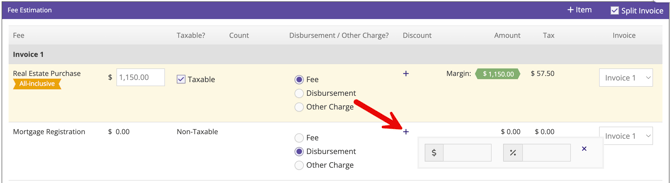
3. **Choose Your Discount Method:**
- **By Dollar Amount ($):** Enter a specific dollar value in the left field to subtract that amount from the line item.
- **By Percentage (%):** Enter a percentage in the right field to reduce the line item by that proportion.
4. **Finalize:** The system will calculate the new total when the "Save" button is clicked. To remove a discount, simply click the **plus (+)** icon and clear the input fields and then click "Save".
---
### Important Rules & Tips
- **Maximum Limit:** The maximum discount allowed is **100%**.
- **Total Reduction:** Applying a 100% discount will "zero out" both the **line item amount** and the associated **GST**.
- [Get started](https://kb.prolegis.ca/get-started?hsLang=en)
- [Real Estate Conveyancing](https://kb.prolegis.ca/real-estate-conveyancing?hsLang=en#main-content)
- [Alberta](https://kb.prolegis.ca/real-estate-conveyancing?hsLang=en#alberta)
- [Ontario](https://kb.prolegis.ca/real-estate-conveyancing?hsLang=en#ontario)
- [Estate Plan](https://kb.prolegis.ca/estate-plan?hsLang=en)
- [Get Organized](https://kb.prolegis.ca/get-organized?hsLang=en)
- [New!](https://kb.prolegis.ca/new?hsLang=en)
- [FAQs](https://kb.prolegis.ca/faqs?hsLang=en)
- [Integrations](https://kb.prolegis.ca/integrations?hsLang=en)
- [Settings](https://kb.prolegis.ca/settings?hsLang=en)
[](http://www.prolegis.ca)
www.prolegis.ca Help Center
Copyright © 2026, Prolegis Solutions Ltd.