---
title: Can I export my trust transactions from Prolegis and import them to Cosmolex?
description: Once the trust accounting option has been activated on a firms’s account in the admin window for that firm, the firm has the ability to create trust ledgers and export those trust transactions via an excel file for import directly into Cosmolex.
---
[Skip to content](https://kb.prolegis.ca/can-i-export-my-trust-transactions-from-prolegis-to-cosmolex#main-content)
[![Full Prolegis Logo.png\]](https://kb.prolegis.ca/hs-fs/hubfs/Full%20Prolegis%20Logo.png?width=200&height=88&name=Full%20Prolegis%20Logo.png)](https://simplicity.prolegis.ca/)
Open main navigation
Close main navigation
- [Home](https://kb.prolegis.ca/)
[Home](https://kb.prolegis.ca/?hsLang=en)
How can we help?
- There are no suggestions because the search field is empty.
1. [Prolegis Knowledge Base](https://kb.prolegis.ca/?hsLang=en)
2. [Real Estate Conveyancing](https://kb.prolegis.ca/real-estate-conveyancing?hsLang=en)
July 14, 2025
# Can I export my trust transactions from Prolegis and import them to Cosmolex?
## Once the trust accounting option has been activated on a firms’s account in the admin window for that firm, the firm has the ability to create trust ledgers and export those trust transactions via an excel file for import directly into Cosmolex.
To activate the trust accounting functionality for the user, select Trust Accounting under General Options on the User’s profile window in Admin.
Set Up
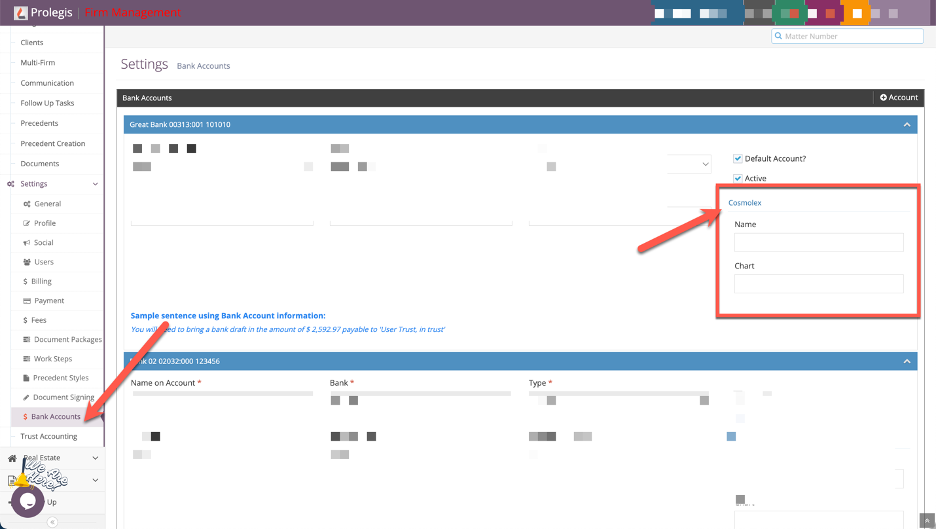
- Navigate to Firm \> Settings \> Bank Account and enter the details of the Trust Accounts that are included in Cosmolex. Enter the name of the bank (the one used in Cosmolex) and the Cosmolex Chart of Accounts number.
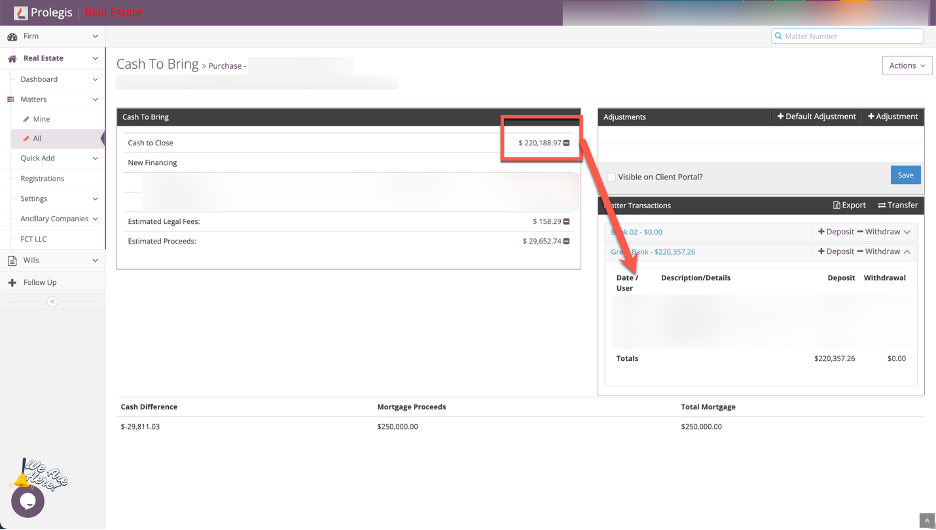
- Navigate to the desired matter and include the entries in the Trust Ledger.
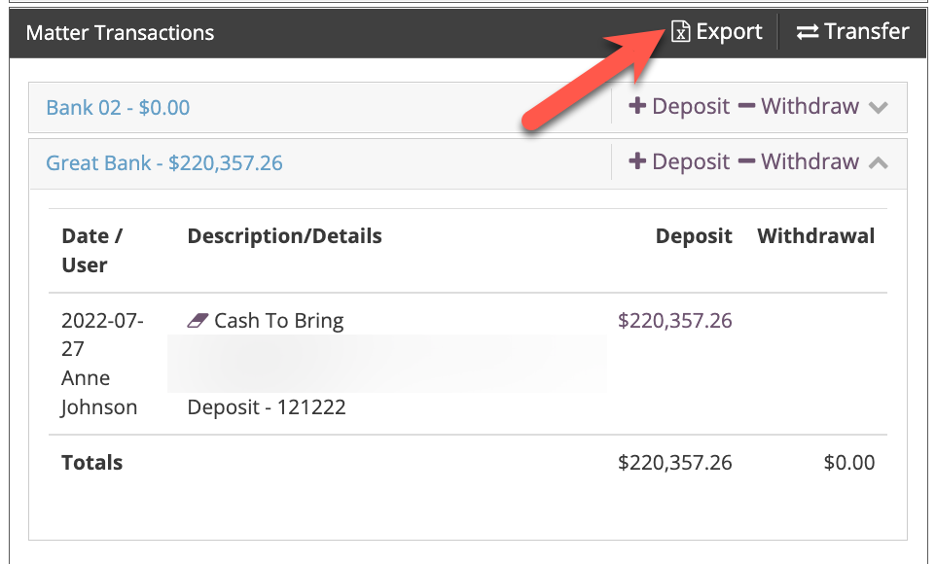
- Click the Export icon in the Matter Transactions window. Prolegis exports an Excel file that will need to be uploaded into Cosmolex. If the user has questions about where the Excel file is stored on their local file management system when downloaded, they will need to confirm with their internal IT resources.
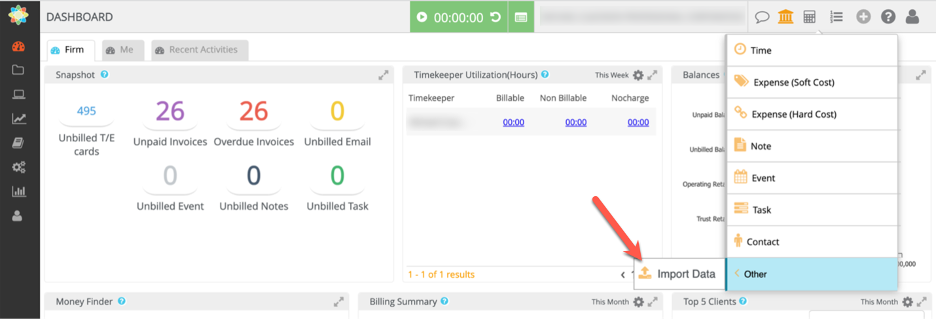
- To upload into Cosmolex, click the + button on the top right side of the layout. Navigate to Other and then Click “Import Data”
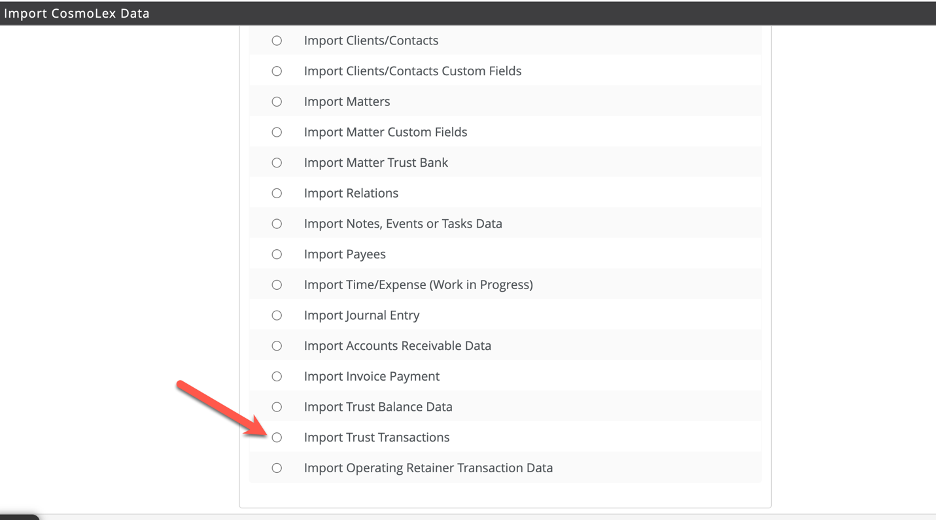
- Select “Import Trust Transactions” and click “Continue”
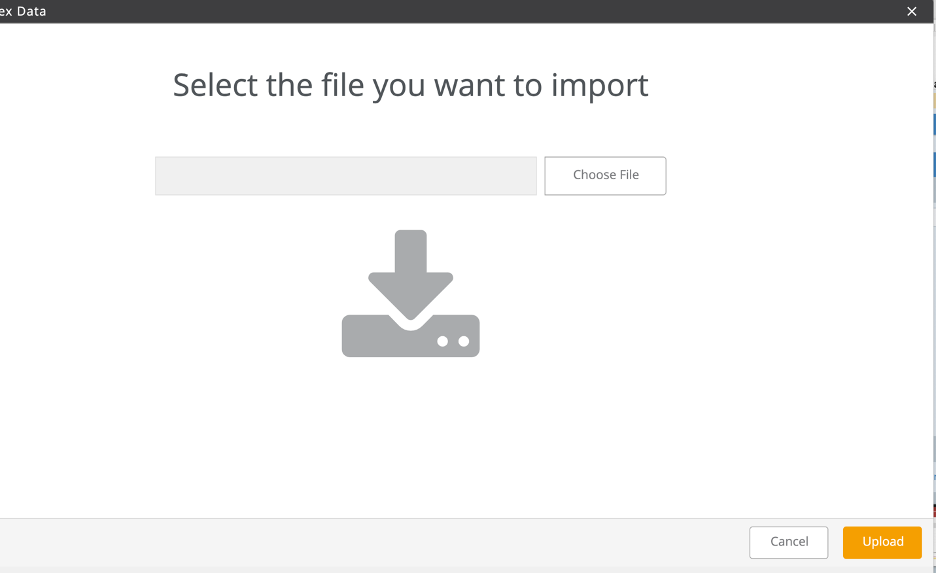
- Upload the Excel file created by Prolegis
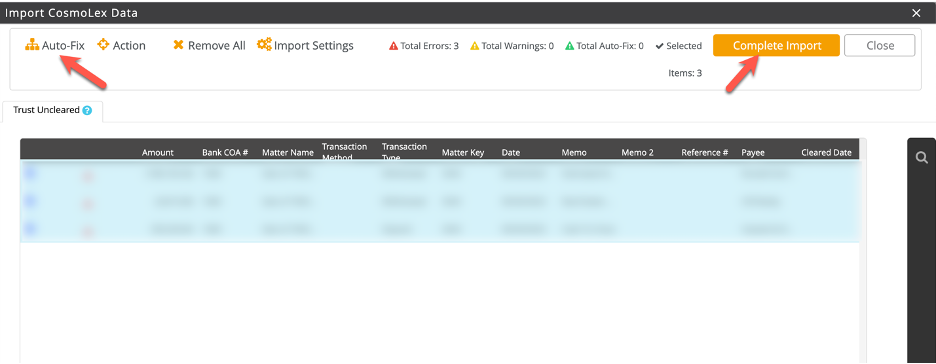
- Select (or deselect) as required to import the desired transactions. Auto-Fix the entries that you would like to import. This will ensure the Click “Complete Import”. The transactions will now be saved in the appropriate matter. Note, in order for the import function to work properly, the matter number in Prolegis must match the matter number in Cosmolex.
- [Get started](https://kb.prolegis.ca/get-started?hsLang=en)
- [Real Estate Conveyancing](https://kb.prolegis.ca/real-estate-conveyancing?hsLang=en#main-content)
- [Alberta](https://kb.prolegis.ca/real-estate-conveyancing?hsLang=en#alberta)
- [Ontario](https://kb.prolegis.ca/real-estate-conveyancing?hsLang=en#ontario)
- [Estate Plan](https://kb.prolegis.ca/estate-plan?hsLang=en)
- [Get Organized](https://kb.prolegis.ca/get-organized?hsLang=en)
- [New!](https://kb.prolegis.ca/new?hsLang=en)
- [FAQs](https://kb.prolegis.ca/faqs?hsLang=en)
- [Integrations](https://kb.prolegis.ca/integrations?hsLang=en)
- [Settings](https://kb.prolegis.ca/settings?hsLang=en)
[](http://www.prolegis.ca)
www.prolegis.ca Help Center
Copyright © 2026, Prolegis Solutions Ltd.