---
title: How can I get notifications of what's happening in Prolegis?
description: You can receive a notification through your web browser when the user has received an SMS message, when a task has been assigned or when there has been an email or fax failure.
---
[Skip to content](https://kb.prolegis.ca/can-i-get-notifications-of-whats-happening-in-prolegis#main-content)
[![Full Prolegis Logo.png\]](https://kb.prolegis.ca/hs-fs/hubfs/Full%20Prolegis%20Logo.png?width=200&height=88&name=Full%20Prolegis%20Logo.png)](https://simplicity.prolegis.ca/)
Open main navigation
Close main navigation
- [Home](https://kb.prolegis.ca/)
[Home](https://kb.prolegis.ca/?hsLang=en)
How can we help?
- There are no suggestions because the search field is empty.
1. [Prolegis Knowledge Base](https://kb.prolegis.ca/?hsLang=en)
2. [Real Estate Conveyancing](https://kb.prolegis.ca/real-estate-conveyancing?hsLang=en)
August 8, 2025
# How can I get notifications of what's happening in Prolegis?
## You can receive a notification through your web browser when the user has received an SMS message, when a task has been assigned or when there has been an email or fax failure.
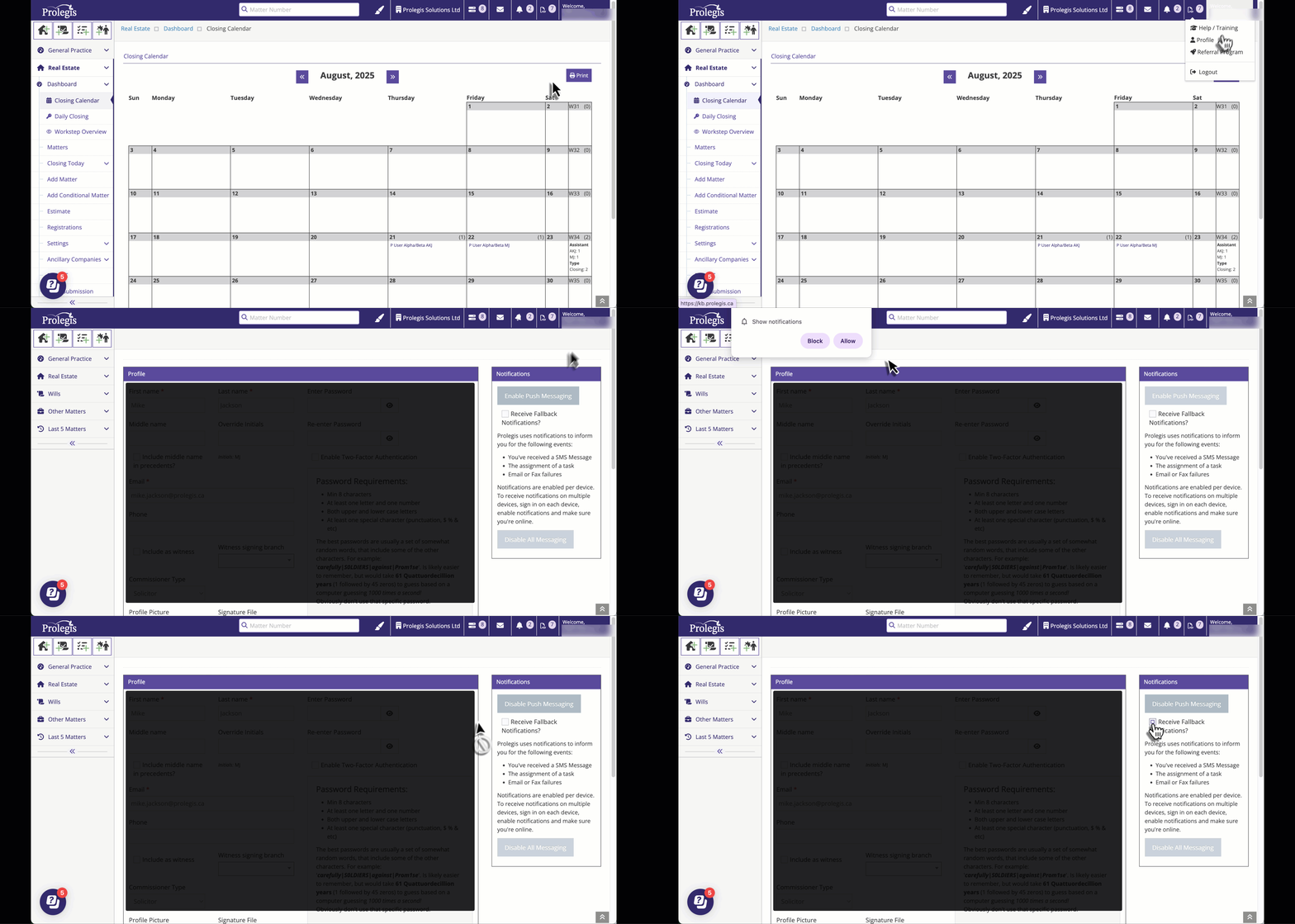
- To select/deselect push messaging, navigate to the top right hand corner of the layout and click on the “Welcome \[username\]” button.
- Select “Profile”
- Select/Deselect “Enable Push Messaging”
- Select “Update”
**NOTE:** you will need to configure your computer to allow notifications from your web browser.
- [Get started](https://kb.prolegis.ca/get-started?hsLang=en)
- [Real Estate Conveyancing](https://kb.prolegis.ca/real-estate-conveyancing?hsLang=en#main-content)
- [Alberta](https://kb.prolegis.ca/real-estate-conveyancing?hsLang=en#alberta)
- [Ontario](https://kb.prolegis.ca/real-estate-conveyancing?hsLang=en#ontario)
- [Estate Plan](https://kb.prolegis.ca/estate-plan?hsLang=en)
- [Get Organized](https://kb.prolegis.ca/get-organized?hsLang=en)
- [New!](https://kb.prolegis.ca/new?hsLang=en)
- [FAQs](https://kb.prolegis.ca/faqs?hsLang=en)
- [Integrations](https://kb.prolegis.ca/integrations?hsLang=en)
- [Settings](https://kb.prolegis.ca/settings?hsLang=en)
[](http://www.prolegis.ca)
www.prolegis.ca Help Center
Copyright © 2026, Prolegis Solutions Ltd.