![Full Prolegis Logo.png]](https://kb.prolegis.ca/hs-fs/hubfs/Full%20Prolegis%20Logo.png?width=200&height=88&name=Full%20Prolegis%20Logo.png)
NOTE: the addition or removal of a client using this tool does not change, edit or revise the buyer(s) and/or seller(s) on the matter. This function only changes which client is related to the matter. This ensures that the correct matters are displayed in the Client > Profile screen and that differences between the client and the associated buyer and/or seller are not overwritten (for example, client is a person but the buyer is the client’s corporation).
To delete a client:
Go to the Firm menu on the left side of the screen. Click Dashboard.
Click the +Filters button. Search for a matter based on any combination of fields.
Click the Actions menu next to the matter and click Edit
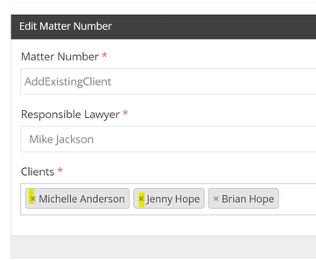
To delete the client, click on the “x” to the left of the client (highlighted in yellow in the image below) that needs to be removed from the matter.
To add a client:
Go to the Firm menu on the left side of the screen. Click Dashboard.
Click the +Filters button. Search for a matter based on any combination of fields.
Click the Actions menu next to the matter and click Edit.
You can either start searching for an existing client by entering 2 or more characters and selecting a client, or you can add a new client by selecting ‘Add new Clients’. You will need to go into the related matter and add the buyer/seller.