![Full Prolegis Logo.png]](https://kb.prolegis.ca/hs-fs/hubfs/Full%20Prolegis%20Logo.png?width=200&height=88&name=Full%20Prolegis%20Logo.png)
Step-by-Step Instructions
Step 1: Navigate to Property Details
- Open the relevant mortgage matter from your dashboard.
- Select the Property Details tab.
Step 2: Enable the Transfer of Land Feature
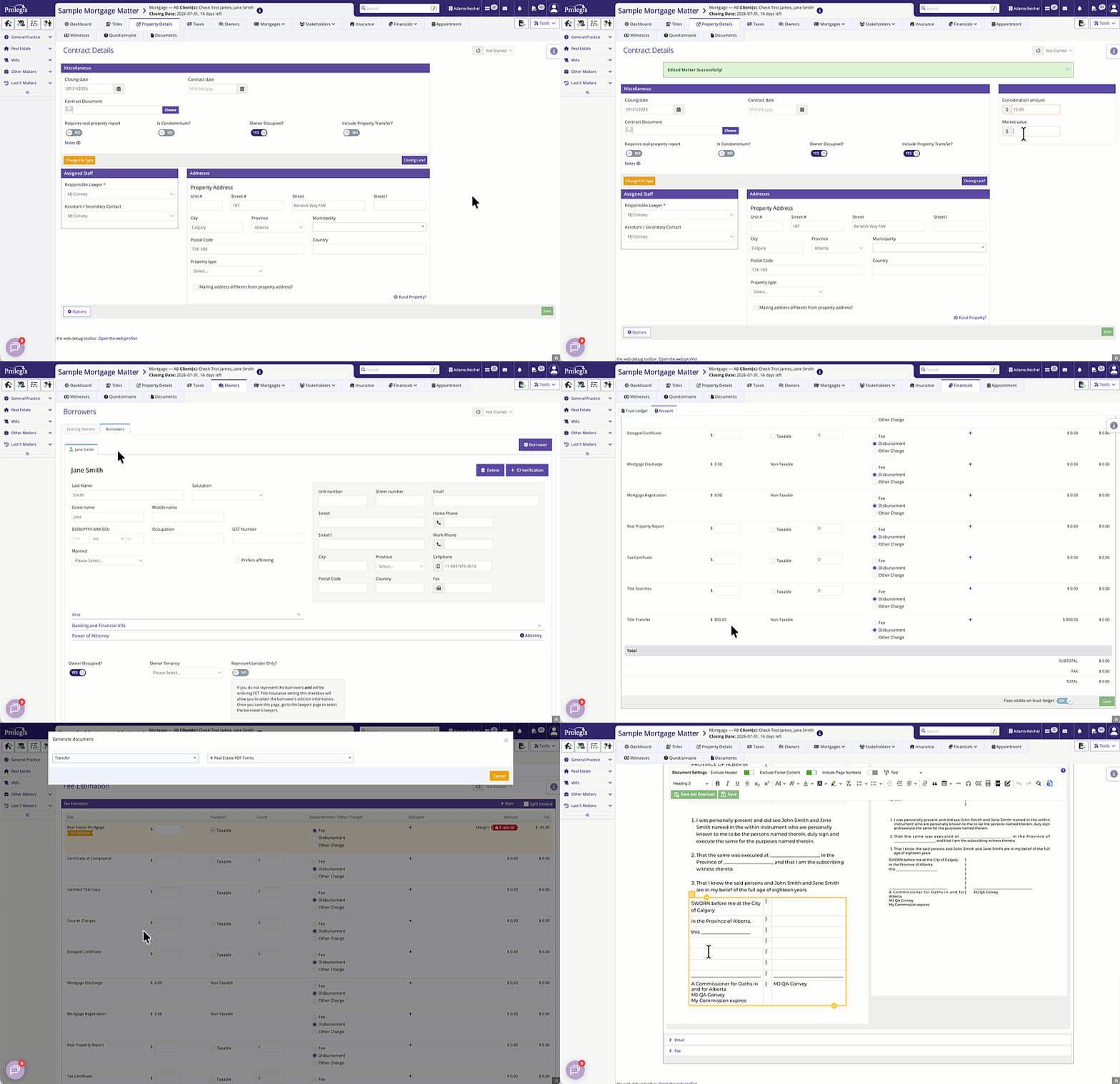
- Locate and click the Include Property Transfer button/checkbox.
💡 What Happens Next? Activating this feature dynamically updates your matter data structure, revealing new fields and advanced contact management options specific to land transfers.
Key Features & Fields Unlocked
Once "Include Property Transfer" is enabled, two major sections will become available:
1. Valuation and Consideration Fields
You will now see dedicated fields required to accurately populate the Transfer of Land document:
- Consideration: Enter the actual monetary amount being exchanged for the property (e.g., $10.00 or a specific purchase price).
- Market Value: Enter the current fair market value of the property. This is crucial for calculating Alberta Land Titles registration fees accurately.
2. Advanced Ownership Management (Owners on Title vs. Mortgagors)
By default, mortgage matters assume the mortgagors are the current owners. Enabling the property transfer decouples these roles, allowing you to handle them separately:
| Role | Description |
| Existing Owners | The individuals or entities currently holding the deed who are transferring the property out of their names. |
| Borrowers | The individuals or entities borrowing the funds and taking new ownership of the property. |
- You can now add, remove, or edit the Existing Owners without altering the information required for the Borrowers.
- Once all property details, consideration values, and ownership roles are finalized, navigate to the Document Generation or Forms tab.
- Select Transfer of Land from your document library.
- Missing Fields? If you cannot see the Consideration or Market Value fields, double-check that the "Include Property Transfer" option has been successfully toggled on and saved.
- Reverting Changes: If you disable "Include Property Transfer" after entering data, the system will hide these fields and default back to standard mortgage ownership rules. Your entered transfer data will be preserved but hidden unless the feature is re-enabled.