---
title: Where do I add the spouse of my buyer / seller?
description: Add a spouse to any client/buyer/seller.
---
[Skip to content](https://kb.prolegis.ca/dower-enhancements#main-content)
[![Full Prolegis Logo.png\]](https://kb.prolegis.ca/hs-fs/hubfs/Full%20Prolegis%20Logo.png?width=200&height=88&name=Full%20Prolegis%20Logo.png)](https://simplicity.prolegis.ca/)
Open main navigation
Close main navigation
- [Home](https://kb.prolegis.ca/)
[Home](https://kb.prolegis.ca/?hsLang=en)
How can we help?
- There are no suggestions because the search field is empty.
1. [Prolegis Knowledge Base](https://kb.prolegis.ca/?hsLang=en)
2. [Real Estate Conveyancing](https://kb.prolegis.ca/real-estate-conveyancing?hsLang=en)
June 4, 2026
# Where do I add the spouse of my buyer / seller?
## Add a spouse to any client/buyer/seller.
When a spouse is added to a real estate transaction, Prolegis will update the documents based on whether dower applies and whether the person is married.
**How to add a spouse?**
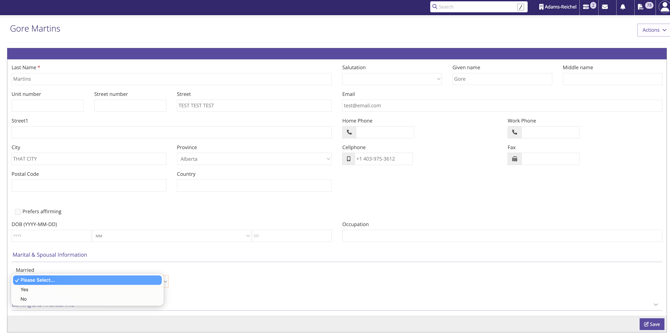
To indicate that a person is married – add that information directly to the client/buyer/seller record in either the **General Practice** \> **Client** Dashboard
or in the Seller/Buyer section of the real estate matter.
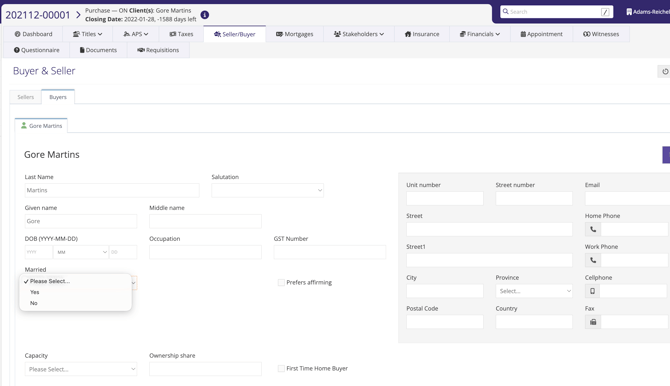
Simply indicate whether the person is married (if no selection is made the default is that the person is married for the purpose of the Dower Act) and if that person is married, enter the name of the spouse. This is not a required field, but can be entered whether or not Dower will apply on the particular transaction.
The dower affidavits that pertain to transfers and mortgages will be updated to reflect the selections. If there is more than one buyer/seller, then Dower will not apply. If there is only one person, then the applicable Dower forms will be available based on whether the person is married.
- [Get started](https://kb.prolegis.ca/get-started?hsLang=en)
- [Real Estate Conveyancing](https://kb.prolegis.ca/real-estate-conveyancing?hsLang=en#main-content)
- [Alberta](https://kb.prolegis.ca/real-estate-conveyancing?hsLang=en#alberta)
- [Ontario](https://kb.prolegis.ca/real-estate-conveyancing?hsLang=en#ontario)
- [Estate Plan](https://kb.prolegis.ca/estate-plan?hsLang=en)
- [Get Organized](https://kb.prolegis.ca/get-organized?hsLang=en)
- [New!](https://kb.prolegis.ca/new?hsLang=en)
- [FAQs](https://kb.prolegis.ca/faqs?hsLang=en)
- [Integrations](https://kb.prolegis.ca/integrations?hsLang=en)
- [Settings](https://kb.prolegis.ca/settings?hsLang=en)
[](http://www.prolegis.ca)
www.prolegis.ca Help Center
Copyright © 2026, Prolegis Solutions Ltd.