---
title: How do I select the nature of the marital relationship (Family Law Act)?
description: In Ontario, the user can indicate the nature of the marital relationship of the users clients, enabling the user to automatically produce the necessary Family Law Act disclosures for transactions.
---
[Skip to content](https://kb.prolegis.ca/family-law-act-ontario#main-content)
[![Full Prolegis Logo.png\]](https://kb.prolegis.ca/hs-fs/hubfs/Full%20Prolegis%20Logo.png?width=200&height=88&name=Full%20Prolegis%20Logo.png)](https://simplicity.prolegis.ca/)
Open main navigation
Close main navigation
- [Home](https://kb.prolegis.ca/)
[Home](https://kb.prolegis.ca/?hsLang=en)
How can we help?
- There are no suggestions because the search field is empty.
1. [Prolegis Knowledge Base](https://kb.prolegis.ca/?hsLang=en)
2. [Real Estate Conveyancing](https://kb.prolegis.ca/real-estate-conveyancing?hsLang=en)
July 1, 2025
# How do I select the nature of the marital relationship (Family Law Act)?
## In Ontario, the user can indicate the nature of the marital relationship of the users clients, enabling the user to automatically produce the necessary Family Law Act disclosures for transactions.
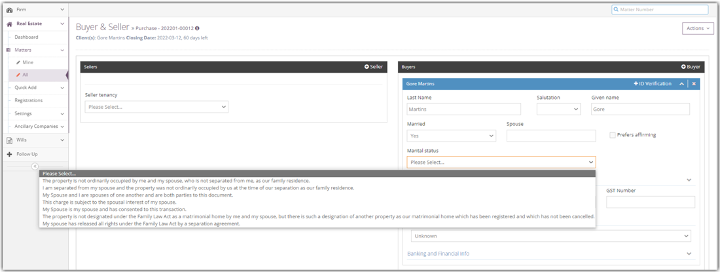
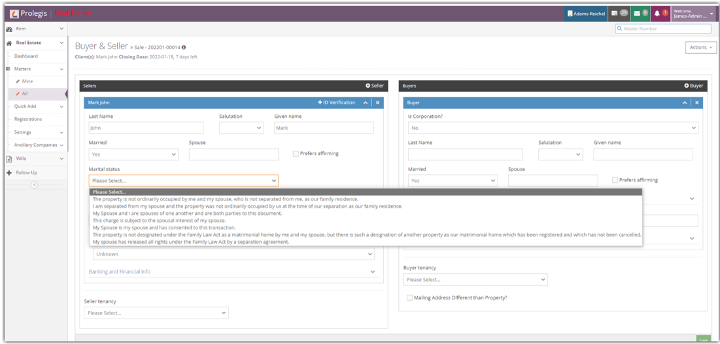
To make the selection, go to Actions \> Buyer & Seller. Click on the down arrow to the right of the name of the client you would like to edit.
Indicate whether the client is Married using the drop down. If the answer is “Yes”, enter the name of your client’s spouse. You’ll be provided with a second drop down under the heading “Marital Status”. Select the applicable marital status and click Save.
- [Get started](https://kb.prolegis.ca/get-started?hsLang=en)
- [Real Estate Conveyancing](https://kb.prolegis.ca/real-estate-conveyancing?hsLang=en#main-content)
- [Alberta](https://kb.prolegis.ca/real-estate-conveyancing?hsLang=en#alberta)
- [Ontario](https://kb.prolegis.ca/real-estate-conveyancing?hsLang=en#ontario)
- [Estate Plan](https://kb.prolegis.ca/estate-plan?hsLang=en)
- [Get Organized](https://kb.prolegis.ca/get-organized?hsLang=en)
- [New!](https://kb.prolegis.ca/new?hsLang=en)
- [FAQs](https://kb.prolegis.ca/faqs?hsLang=en)
- [Integrations](https://kb.prolegis.ca/integrations?hsLang=en)
- [Settings](https://kb.prolegis.ca/settings?hsLang=en)
[](http://www.prolegis.ca)
www.prolegis.ca Help Center
Copyright © 2026, Prolegis Solutions Ltd.