---
title: I received my mortgage instructions. Now what?
description: Prolegis has a full integration with FCT LLC and has built in tools along with a lender document database connected to our PDF Filler. This means legal teams have Prolegis curated auto-populated documents available to them in addition to having their own ability to complete lender PDFs in Prolegis.
---
[Skip to content](https://kb.prolegis.ca/i-received-my-mortgage-instructions-now-what#main-content)
[![Full Prolegis Logo.png\]](https://kb.prolegis.ca/hs-fs/hubfs/Full%20Prolegis%20Logo.png?width=200&height=88&name=Full%20Prolegis%20Logo.png)](https://simplicity.prolegis.ca/)
Open main navigation
Close main navigation
- [Home](https://kb.prolegis.ca/)
[Home](https://kb.prolegis.ca/?hsLang=en)
How can we help?
- There are no suggestions because the search field is empty.
1. [Prolegis Knowledge Base](https://kb.prolegis.ca/?hsLang=en)
2. [Real Estate Conveyancing](https://kb.prolegis.ca/real-estate-conveyancing?hsLang=en)
January 26, 2026
# I received my mortgage instructions. Now what?
## Prolegis has a full integration with FCT LLC and has built in tools along with a lender document database connected to our PDF Filler. This means legal teams have Prolegis curated auto-populated documents available to them in addition to having their own ability to complete lender PDFs in Prolegis. Requests for funds can be sent from Prolegis by email or by fax.
Navigate to the **Mortgages** screen. If you are in a refinance, you'll navigate to **Mortgages \> New Mortgages**.

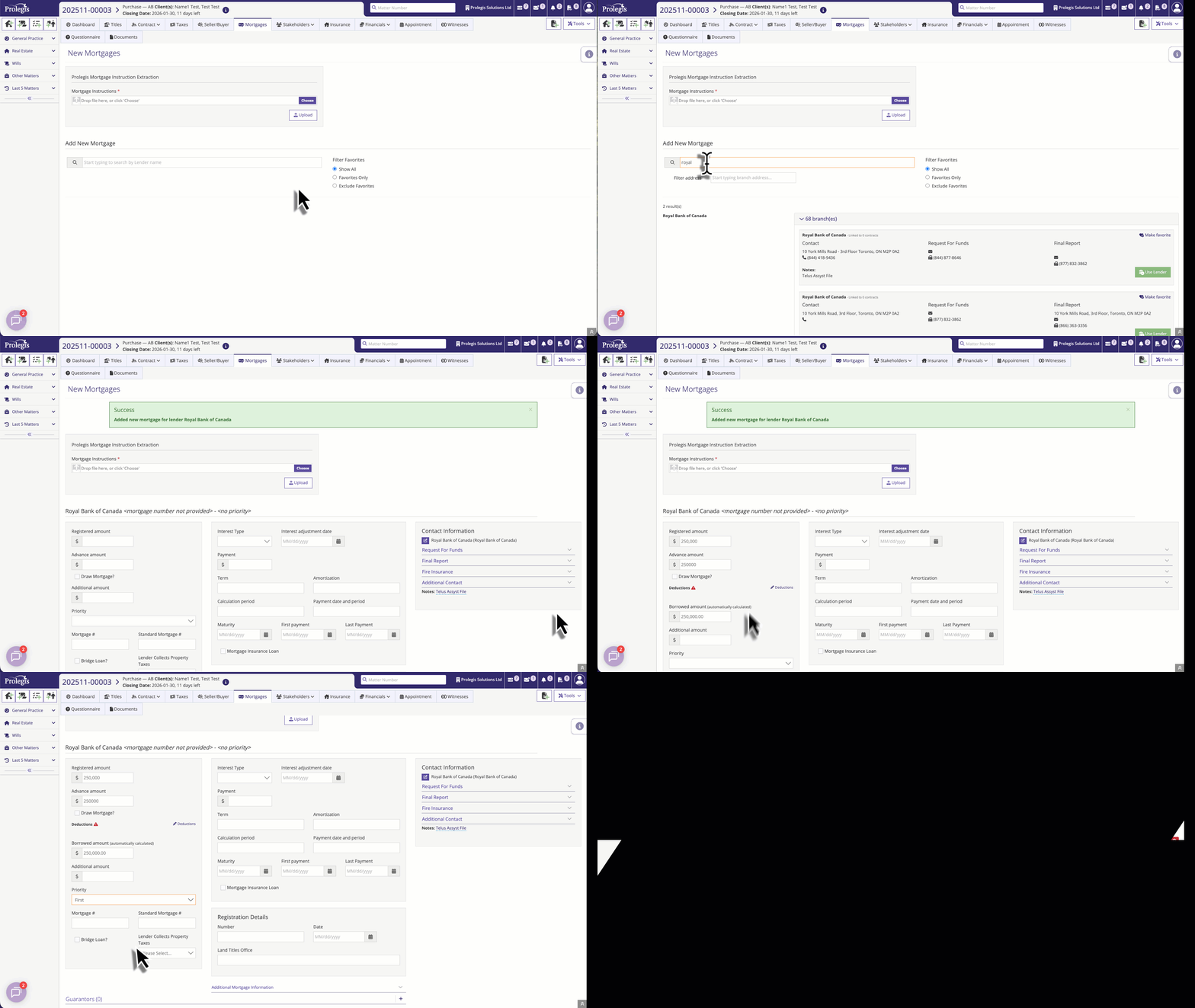
If Prolegis' automatic document intake is enabled for your firm, upload the mortgage instructions to Prolegis. If not, add a new mortgage to Prolegis and enter the information as demonstrated below:
Use the Available Templates menu to select the documents you would like to produce.
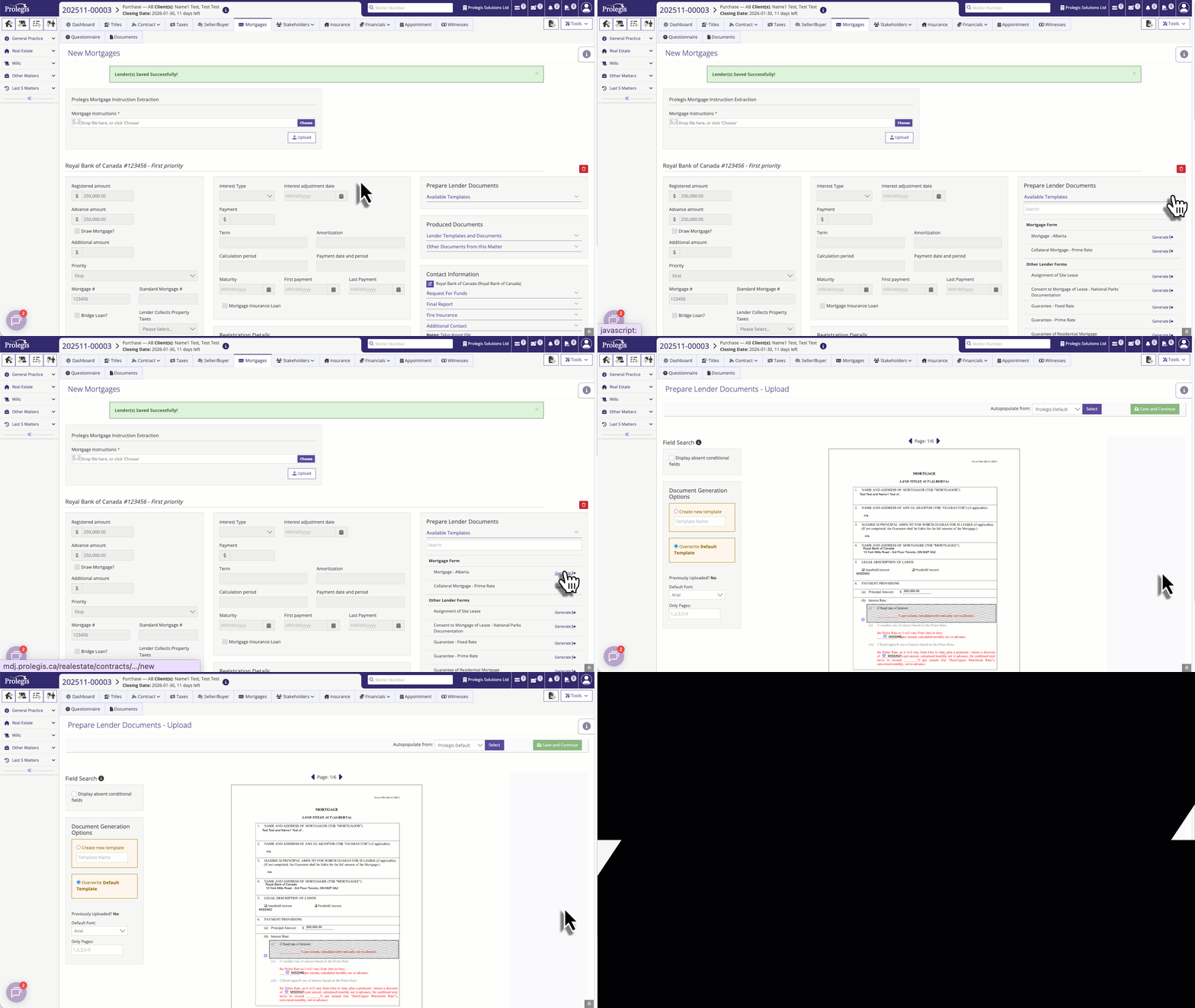
If you are missing information that is required for your document, complete your data entry then return to the **Mortgage** screen
- [Get started](https://kb.prolegis.ca/get-started?hsLang=en)
- [Real Estate Conveyancing](https://kb.prolegis.ca/real-estate-conveyancing?hsLang=en#main-content)
- [Alberta](https://kb.prolegis.ca/real-estate-conveyancing?hsLang=en#alberta)
- [Ontario](https://kb.prolegis.ca/real-estate-conveyancing?hsLang=en#ontario)
- [Estate Plan](https://kb.prolegis.ca/estate-plan?hsLang=en)
- [Get Organized](https://kb.prolegis.ca/get-organized?hsLang=en)
- [New!](https://kb.prolegis.ca/new?hsLang=en)
- [FAQs](https://kb.prolegis.ca/faqs?hsLang=en)
- [Integrations](https://kb.prolegis.ca/integrations?hsLang=en)
- [Settings](https://kb.prolegis.ca/settings?hsLang=en)
[](http://www.prolegis.ca)
www.prolegis.ca Help Center
Copyright © 2026, Prolegis Solutions Ltd.