![Full Prolegis Logo.png]](https://kb.prolegis.ca/hs-fs/hubfs/Full%20Prolegis%20Logo.png?width=200&height=88&name=Full%20Prolegis%20Logo.png)
NOTE: Enable the Clio Sync to facilitate the auto-matic upload - Clio Integration.
Once within the desired matter, navigate to Actions > Account or Fee Estimation
After the account has been saved, go to the bottom of the page to and click the blue Export button.
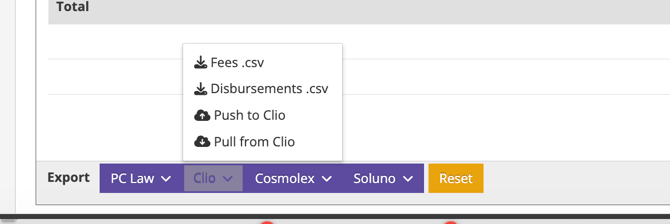
To push directly to Clio, click "Push to Clio". You will see the fees and disbursements updated to show their link to Clio.
To pull directly from Clio, click "Pull from Clio"
If you would prefer to upload manually, go to the following link:
- Click Add
- Under Import select Activities from CSV
- Under User select the Clio User who should be associated with the imported entries
- Click Choose File
- Select the Activity file you wish to import
- Click Upload File
- Wait for the State of the Activities import to reach Complete
See: https://support.clio.com/hc/en-us/articles/115001856474-How-to-Import-Activities-